A robot kit that snaps together and sits on a shelf is a model. A robot kit that crawls, spins, or scurries across your floor after you finish building it is a real machine. The difference between the two determines whether your hours of assembly end in a display piece or a working robot you can actually play with.
I’m Emma — the founder and writer behind Baby Bangs. I’ve spent years analyzing STEM toy markets, evaluating gear-train reliability, motor torque specs, and app connectivity across hundreds of kits to separate the ones that march from the ones that just look good in the box.
This guide breaks down the motorized mechanics, structural durability, and real-world build experience of each kit so you can confidently pick the best build a robot kit for your next project.
How To Choose The Best Build A Robot Kit
The robot kit market splits into two worlds: kits that teach you how things move by making you assemble the drivetrain yourself, and kits that hide the mechanics inside pre-formed shells. Your choice depends on how much tinkering you want after the last piece clicks in.
Power Source: Spring vs Electric Motor
Spring-driven kits like the UGEARS Hexapod rely on wound coils that store and release energy through gear trains. They need no batteries and teach pure mechanical transmission, but they run for a fixed distance and stop. Electric motor kits give continuous motion, app control, and sound or remote activation, at the cost of battery management and more complex wiring.
Build Difficulty and Part Fit
Part count alone doesn’t tell the full story. A 388-piece wooden model with no glue requires precision sanding and waxing to reduce friction — you’ll spend as much time tuning as assembling. A 635-piece ABS block kit with numbered bags lets you snap sections together in sequence with almost no tuning. Check whether the manual is purely visual (as in UGEARS) or includes written steps, and look for reviews that mention whether moving parts need post-build adjustment.
Post-Build Functionality
A kit that does one thing well beats a kit that does five things poorly. If you want a robot that responds to claps and rolls on its own, the Thames & Kosmos Hedgehog delivers a focused sound-activated experience. If you want programmable patterns, path control, and voice commands, an app-connected kit like the okk robot offers five different control modes. Decide whether the robot will be a build-once display piece or a daily driver before you choose the feature set.
Quick Comparison
On smaller screens, swipe sideways to see the full table.
| Model | Category | Best For | Key Spec | Amazon |
|---|---|---|---|---|
| UGEARS Hexapod Explorer | Spring Walker | Mechanical engineering enthusiasts | 388 pieces, spring motor, walks 3 meters | Amazon |
| Suplanet 5-in-1 Robot | Block Kit | Kids aged 8–14 learning remote control | 495 pieces, 5 models, app + remote | Amazon |
| Thames & Kosmos Hedgehog | Sound Activated | Clap-controlled interactive play | 172 pieces, sound sensor, LED eyes | Amazon |
| okk Robot Building Kit | App Programmable | Kids 6+ wanting coding and voice control | 635 pieces, USB rechargeable, 5 control modes | Amazon |
| Tinkering Labs STEM Kit | Open Ended | Creative tinkering and circuit exploration | 50+ parts, motors, unlimited inventions | Amazon |
In‑Depth Reviews
1. UGEARS Hexapod Explorer 3D Puzzle
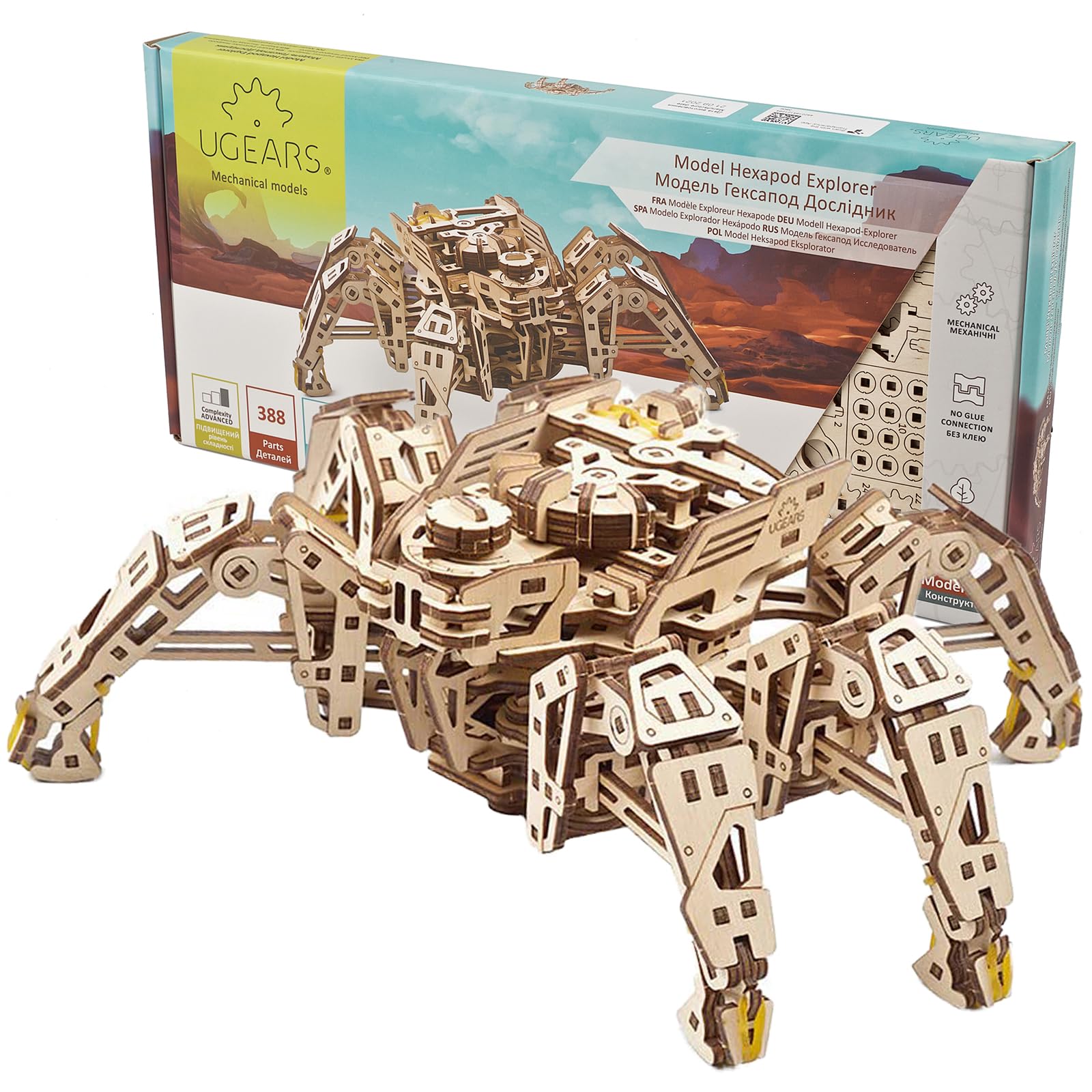
The UGEARS Hexapod is a pure mechanical marvel — no batteries, no screens, no app pairing. A wound spring motor drives a six-legged walking mechanism that pushes the wooden chassis forward up to three meters, stepping over small obstacles like a real insect. The variable speed dial on the head lets you adjust the crawl from a slow creep to a fast skitter, and when you lift it off the ground the legs flail in a surprisingly lifelike beetle panic.
The 388 laser-cut plywood pieces snap together without glue, but the build demands patience. The manual is purely visual, so you study each step carefully. Veteran builders emphasize sanding every moving surface with fine grit and waxing the contact points before final assembly — friction management is the difference between a robot that walks and one that stalls. Plan for an eight-hour session if you take the time to tune each gear joint.
This kit rewards adult builders and older teens who want to understand gear ratios, torque transfer, and mechanical linkage without electronic intervention. It’s not a toy you hand to a kid and walk away — it’s a focused engineering project that produces a real walking machine.
Why it’s great
- Spring-powered walking action with no batteries needed
- Speed control dial changes gait mid-operation
- Lifelike insect leg behavior when lifted
- Precise laser-cut parts with no glue required
Good to know
- Visual-only manual requires careful study
- Friction tuning (sanding and waxing) is essential for smooth walking
- Not suitable for builders under 14 without adult help
2. Suplanet 5-in-1 Remote Control Robot

Suplanet’s kit packs 495 ABS block pieces into a single box that can rebuild into five different models — a stunt robot, a tank, an engineering vehicle, and two other configurations. Each build shares a common motor core and remote receiver, so you disassemble one form to create the next. The block-based assembly is familiar to any child who has built with interlocking brick systems, making the build process straightforward without being trivial.
The dual control system sets this kit apart from simpler remote-only sets. A standard 2.4 GHz remote controls driving and steering, while the Bluetooth app adds gyroscope tilt control, path recording, and a drag-and-drop programming interface. The programming mode lets you sequence movements without writing code, which builds computational thinking without the frustration of syntax errors. Parents report that children as young as eight manage the app controls after a short tutorial.
ABS plastic construction makes the models tough enough for repeated play on hard floors and carpets. The instructions are mostly clear, though a few steps benefit from adult interpretation. At this price point, the five-model flexibility and app programming layer deliver strong educational value for families with kids in the 8–14 range.
Why it’s great
- Five different robot models from one kit encourage rebuilding
- App control includes gyroscope, path, and programming modes
- ABS blocks are sturdy and survive falls
- Good parent-child activity with clear step-by-step build
Good to know
- Only one model can be built at a time
- Instructions occasionally need adult interpretation
- Batteries for remote not included
3. Thames & Kosmos My Robotic Pet Tumbling Hedgehog
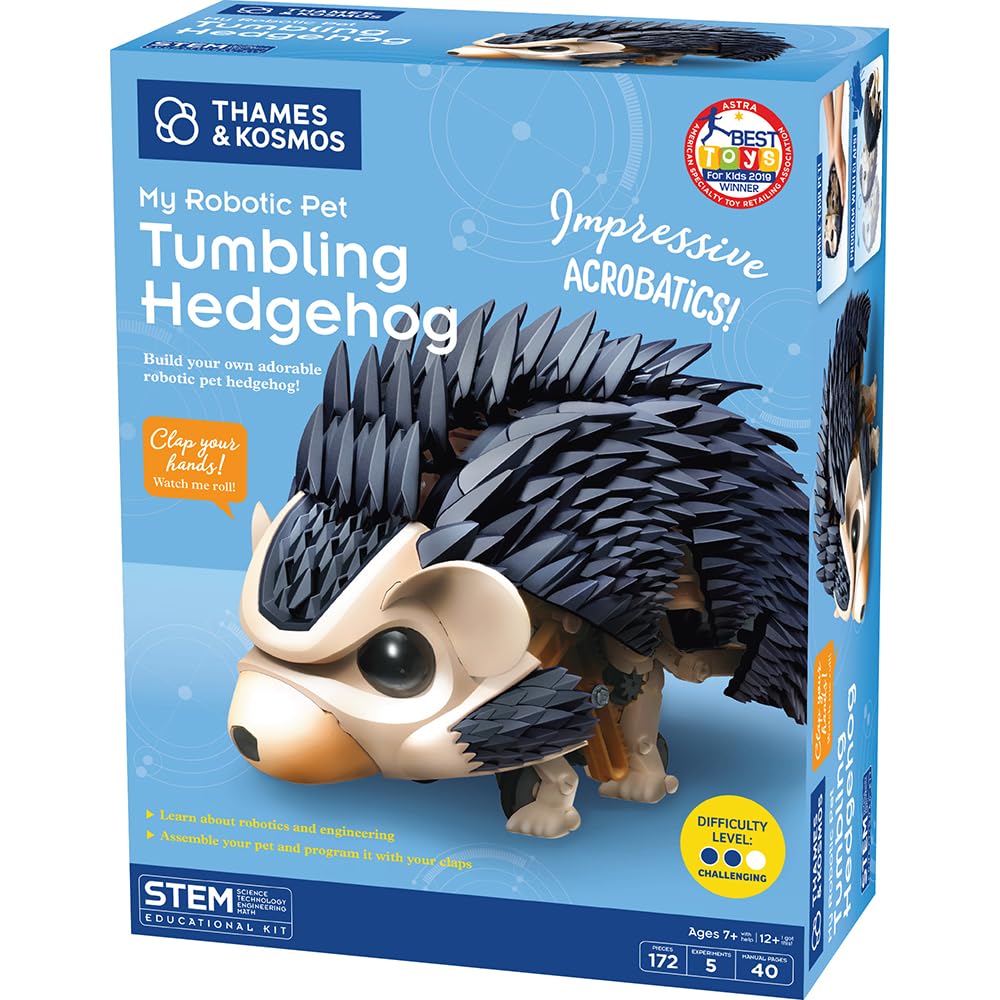
The Hedgehog kit turns a clap into a command. Its internal sound sensor detects different clap patterns and triggers specific reactions: one clap makes the hedgehog curl up and tumble backward once, multiple claps produce a rolling sequence, and loud applause wakes it from its bored sleep mode. The LED eyes light up during movement, and the robot bristles its spine pieces as it scurries. It’s a focused, single-purpose build that emphasizes cause-and-effect logic over open-ended programming.
With 172 pieces and a build time of one to two hours, this is the most achievable kit here for younger builders. The manual includes explanations of how the gears, motor, sound sensor, and LEDs work together, giving a concise mechanical and electronic education without overwhelming. The build does require snipping parts from frames and careful gear alignment — several builders noted that a loose gear seat or an incorrectly seated motor bracket can cause the robot to stall or fail to respond to claps.
This kit works beautifully on smooth floors where the tumbling action is consistent. On thick carpet, the hedgehog’s lightweight chassis struggles to roll. It’s best treated as a short, satisfying weekend project for children aged 7–12 who want a pet-like robot that reacts to them without a phone screen.
Why it’s great
- Sound-activated response teaches cause-and-effect logic
- Short 1–2 hour build suits younger attention spans
- LED eyes and spine movement add personality
- Included manual explains gear and motor principles
Good to know
- Parts must be snipped from frames with care
- Does not tumble reliably on thick carpet
- Some units need gear break-in before smooth operation
4. okk Robot Building Toys STEM Kit

The okk kit is the most feature-dense option here, packing 635 ABS pieces, a rechargeable battery, a 2.4 GHz remote with 65-foot range, and a Bluetooth app that unlocks five control modes: remote, path, voice, gravity sensor, and stem programming. The robot’s head, shoulders, arms, elbows, and tracks all rotate independently, letting it express different poses and emotions beyond simple forward-backward movement. The LED eyes and articulated eyebrows add a layer of personality that younger children particularly enjoy.
The programming mode uses a drag-and-drop interface that sequences motion commands without requiring text-based coding. Builders can create movement patterns on their phone and watch the robot execute them in real time. The USB rechargeable battery charges fully in about two hours and delivers roughly one hour of continuous play — a significant convenience over AA-dependent kits. Remote control works on both carpet and hard floors, though turning on deep carpet can bog the tracks slightly.
Instructions are picture-based and organized by numbered bags, but several builders noted the bags are not individually labeled, so you dump and sort all pieces before starting. The 635-piece count makes this a multi-session project for most kids aged 8–14. For the combination of rechargeability, five control modes, and expressive articulation, this kit offers the most lasting play value per build hour.
Why it’s great
- USB rechargeable battery eliminates battery waste
- Five app control modes including voice and programming
- Articulated joints allow expressive poses and movements
- Works on carpet and hard floors
Good to know
- Bags not numbered; all pieces must be sorted first
- Remote needs 2 AAA batteries (not included)
- One hour runtime per full charge
5. Tinkering Labs STEM Kit Electric Motors Catalyst

The Tinkering Labs kit doesn’t come with a single predetermined robot design. Instead, it provides a bag of real hardware — laser-cut wood pieces, two electric motors, metal connectors, rubber bands, screws, and a battery pack — and challenges you to invent your own machine. The included guide suggests project ideas like a robotic arm, a self-propelled cart, or a drawing machine, but the real goal is open-ended problem solving. You decide what to build, then figure out how to make it move.
This approach is radically different from the step-by-step builds above. There is no manual to follow page by page. You learn by failing: a motor mounted too loosely wobbles instead of driving the wheels, an unbalanced chassis tips over at the first turn, a circuit connection that isn’t firm enough cuts power mid-run. Each failure teaches something about torque, weight distribution, and electrical continuity. Builders as young as seven can participate with adult guidance, while older children and adults tackle more complex designs independently.
All parts are non-toxic, reusable, and durable enough for repeated assembly and disassembly. The metal hardware and real wood pieces feel substantial compared to snap-together plastic kits. If you want a child to understand that engineering is about iteration and creativity rather than following a diagram, this kit delivers that lesson more effectively than any pre-molded robot set on the market.
Why it’s great
- Unlimited design possibilities encourage creative problem solving
- Real hardware (metal, wood, motors) teaches authentic engineering
- Parts are reusable for hundreds of builds
- Screen-free, hands-on tinkering
Good to know
- No step-by-step manual; requires self-direction
- Younger children need adult supervision for motor wiring
- Batteries not included
FAQ
How long does a typical build a robot kit take to assemble?
Which robot kit is best for a child who has never built one before?
Can robot kits be rebuilt into different designs after the first build?
Final Thoughts: The Verdict
For most users, the build a robot kit winner is the okk Robot Building Kit because it combines the highest part count, USB rechargeability, five control modes including voice and programming, and expressive articulation that keeps kids engaged long after the build is complete. If you want a pure mechanical challenge that teaches gear trains and spring torque, grab the UGEARS Hexapod Explorer. And for open-ended creative tinkering where the child invents their own robot rather than following instructions, nothing beats the Tinkering Labs STEM Kit.